For coaches on the sideline
From kickoff
to season stats.
On your wrist
and iPhone.
Set up the match on iPhone, send it to Apple Watch. At the field the phone stays in your pocket, and the watch keeps time. No watch with you? Then the match runs just the same on iPhone.

The home screen
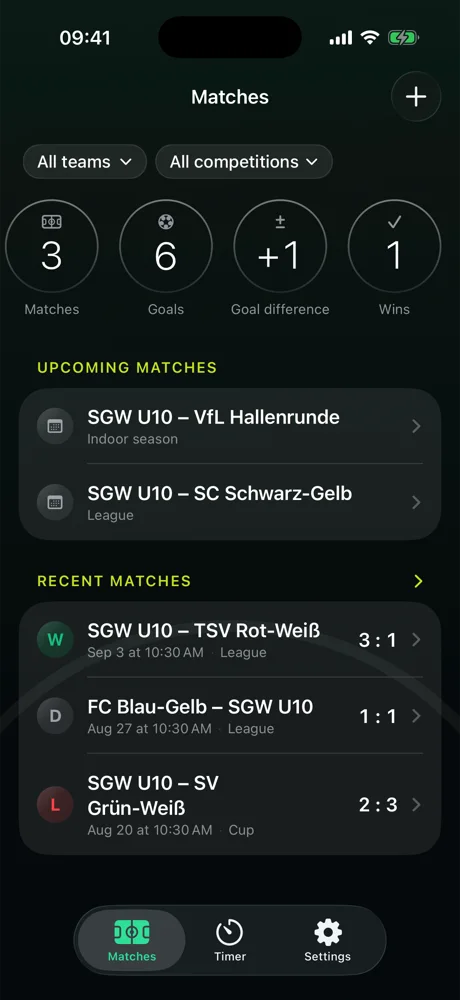
The season is right there before you tap anything.
Above the match list, the numbers sit as circles: matches, goals, goal difference, wins. Which ones is up to you: ten to choose from, including win rate, clean sheets and goals per match, in the order that matters to you. Two pills above narrow it down: team and competition. Below, the upcoming matches and the recent ones with their result badge.
-
Ten stats, your pick
A long press on the bar opens the picker. What you don't need disappears.
-
By team and competition
Just the league, just indoor, just the U10. The circles count exactly what the pills say.
-
Upcoming and recent matches
The next match on top, the last ten below, everything else in the archive.
How a game day works
Set up on iPhone. Run on the watch. Read up in the report.
-
Set up on iPhone
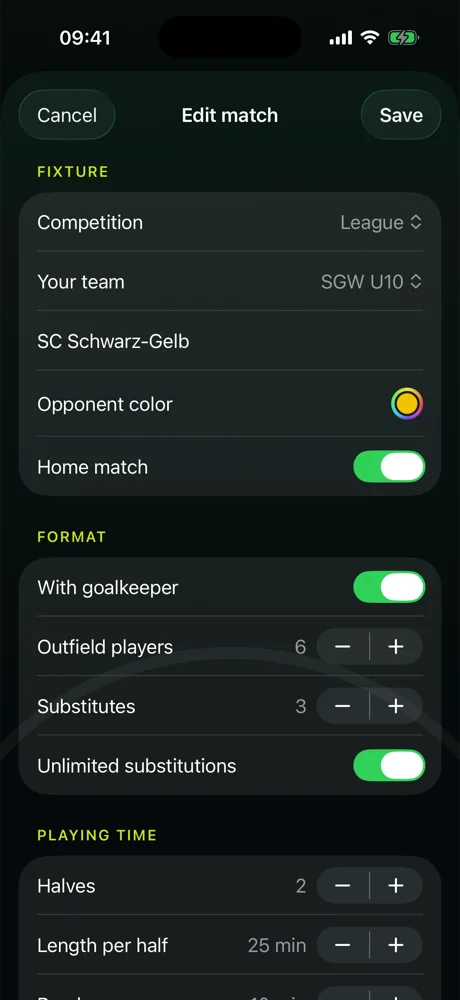
Opponent, home or away, competition, format. If you like, pick the lineup and bench from your roster.
-
Send to the watch
One tap and the match is waiting on your Apple Watch. Kick off when the referee blows the whistle.
-
Run it at the field
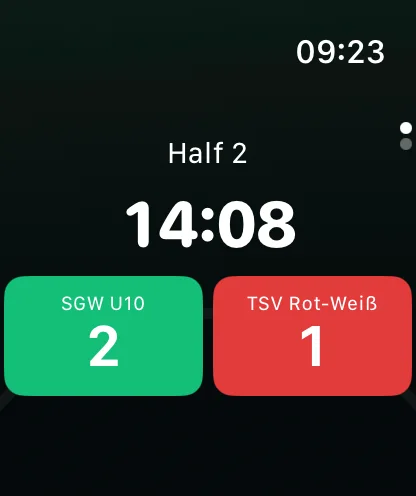
Clock with stoppage time, halftime countdown, goals with a tap. One page down: subs and cards.
-
Report on iPhone
The final score comes back on its own: a timeline with scorers, cards, subs and everyone's playing time.
On Apple Watch
Goal, sub, card. One tap each.
The clock counts up, stoppage time changes color. A tap on the team counts the goal, then the watch asks who scored, if you want it to. Turn the crown one page down and there's your lineup and bench: one tap substitutes, one tap gives the card. And you keep halftime in view without looking: before the end of the half and of the break your wrist gets a tap, and if you want, a reminder to rotate every few minutes.
-
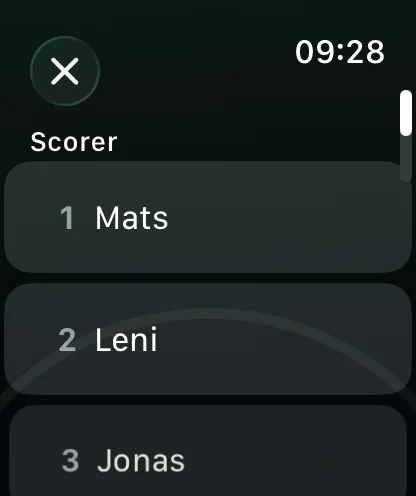
Scorer after the goal
-
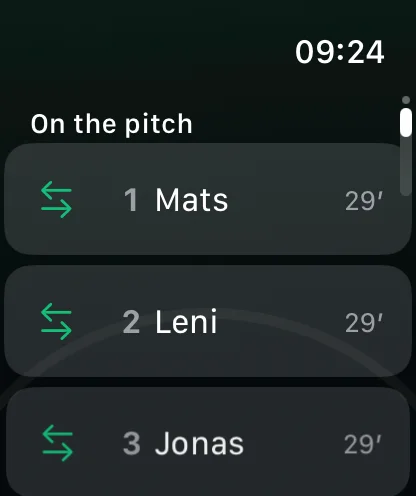
Subs and cards
-
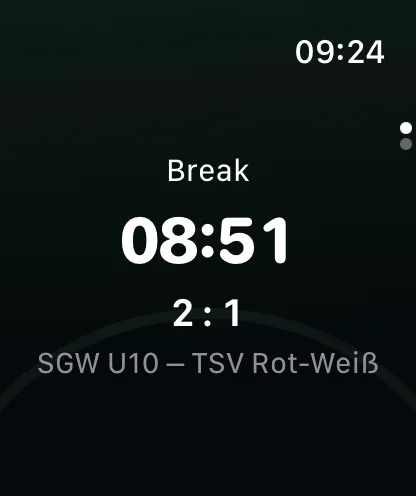
Halftime with the score
Match report
Who scored, who got booked, who played how long.
-
Teams with rosters
Players, jersey numbers, kit colors. Several teams, if you coach several.
-
Match report with timeline
Kickoff, goals with scorers, subs, cards, halftime, final whistle. In the order it happened.
-
Playing time per player
Including those with zero minutes. That's not noise, that's the finding.
-
Season stats
Matches, appearances, minutes and goals per player, filterable by competition.
-
Archive
Every match by month, with search and filters by team, competition and year.
-
Share the report
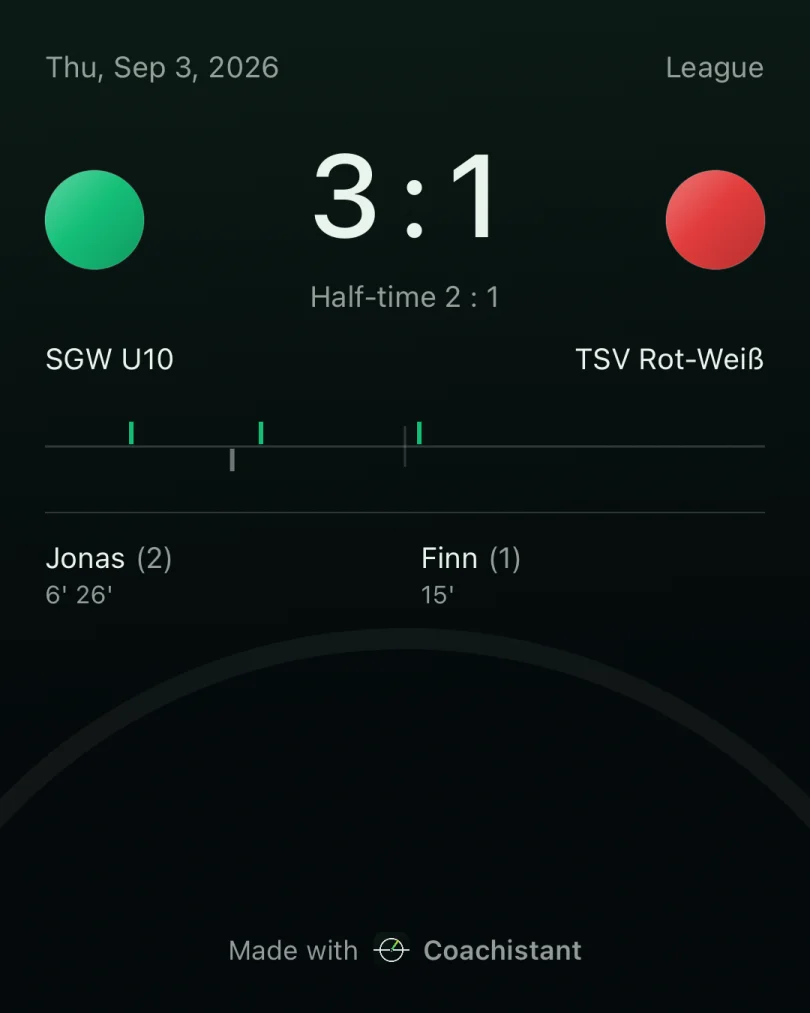
As an image to the team chat: score, halftime score, scorers with minutes.
-
No watch
No Apple Watch with you? The match runs just the same on iPhone.
-
All optional
If all you need is the clock and the score, you never see the roster. A match takes twenty seconds to set up.
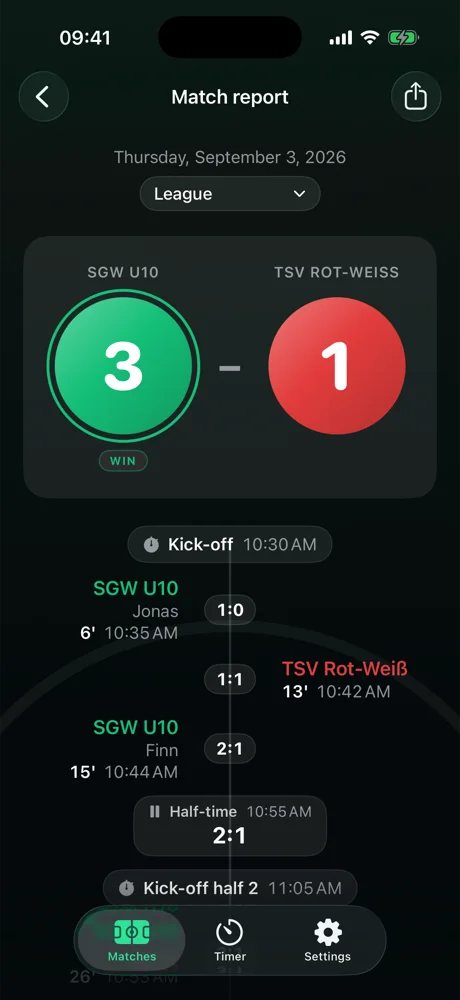
For the team chat
The match report, shared as an image.
One tap at the top right of the report, then Messages or WhatsApp: score, halftime score, goals on the timeline, scorers with minutes. Ready to go, nothing to type.
Across the season
Fair rotation, in black and white.
Matches in the squad
Appearances on the field
Minutes of playing time
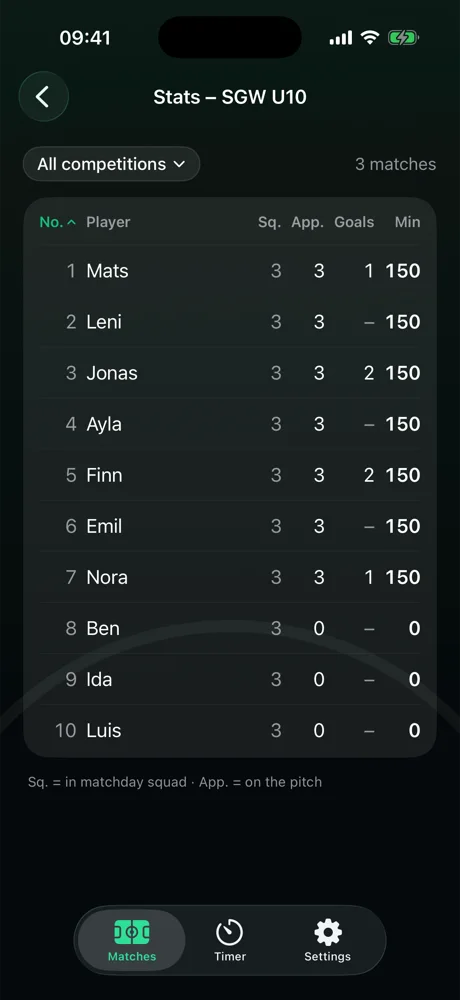
Coachistant separates two numbers that are easy to confuse: matches in which someone was in the game-day squad, and appearances with time on the field. Add the playing time across the season, for every player. Whoever is getting too little shows up here first.
Practice
Intervals on the watch, without looking at your phone.
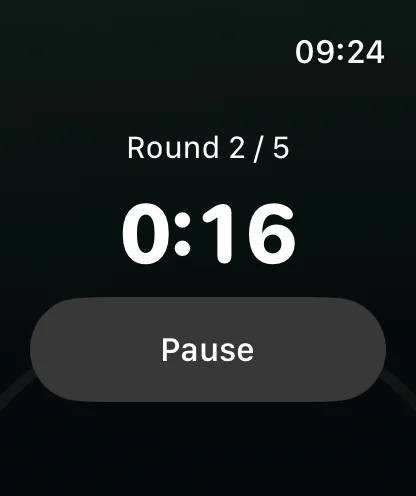
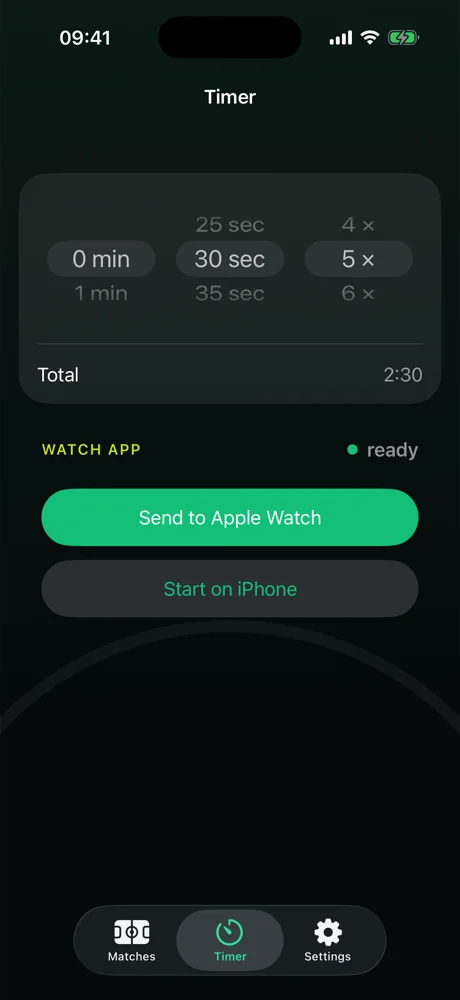
Three wheels on iPhone: minutes, seconds, rounds. One tap sends the timer to the watch, where it starts at the push of a button. Every phase change arrives as a tap on the wrist; pause and resume are one tap. For sprints, circuits and anything that runs in rounds. The timer runs on iPhone without a watch, too.
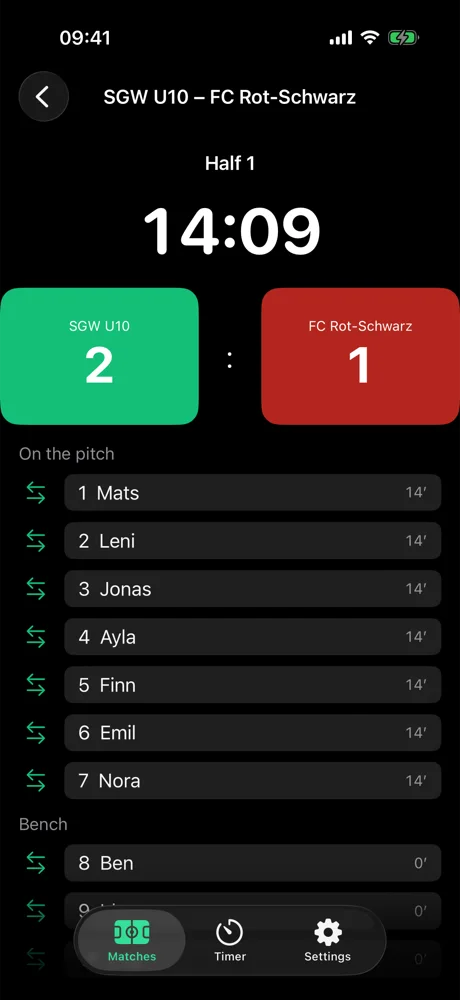
Works without a watch
No Apple Watch? Then the iPhone keeps time.
Same screen, same taps: clock with stoppage time, goal with a tap on the team, below it field and bench for subs and cards. The Apple Watch is the more convenient way, not a requirement.
-
Survives switching apps
Every state is saved immediately. Back in Coachistant the clock keeps running as if nothing happened.
-
Long press instead of a stray tap
A goal is undone with a long press, a half is ended with a long press on the clock. Nothing happens by accident.
-
The same report
Watch or iPhone: after the final whistle the match sits in the archive with scorers, cards and playing time.
- no account
- no server
- no ads
Before you start
What it needs.
- iPhone
- iOS 17 or later. This is where matches are set up and reports are read, and where a match runs without a watch.
- Apple Watch
- watchOS 10 or later, optional. The watch runs the match at the field and sends the final score back.
- Format
- Halves from 20 to 45 minutes, small-sided or full-size, with or without a goalkeeper, substitution limits to match your league rules.
- Languages
- English and German.
During a match the watch app starts a workout session so the watch keeps running while your wrist is down. It reads no health data.
Privacy
There is no server.
Coachistant has no backend, no account and no subscription. Everything you enter stays on your iPhone and your watch. Nothing is collected, because there is nowhere to send it. A match report leaves the device only when you share it yourself.
Questions
Short answers.
- Do I need an Apple Watch?
- No. With a watch the phone stays in your pocket, without one the match runs on iPhone. Everything else is the same.
- Which formats work?
- Halves are freely adjustable, typically 20 to 45 minutes. Three to eleven outfield players, with or without a goalkeeper, substitutions limited or unlimited. The defaults live on the team and can be overridden per match.
- What if the watch dies mid-game?
- The clock isn't counted, it's calculated from kickoff. Once the watch is back on, the right minute is there. The result only goes to the iPhone after the final whistle; until then the watch runs the match on its own.
- Do I have to maintain a roster?
- No. Without a roster there's just clock and score, and you won't notice anything missing. With a roster you get subs, cards, scorers and playing time.
- Where is my data?
- On your iPhone and your watch. There is no server and no account. Delete the app and the data goes with it.
- Several teams?
- Yes, each with its own roster, colors and defaults. Stats and archive can be filtered per team.
The phone stays in your pocket.
Coachistant is built for the sideline, not the desk. A glance at your wrist tells you how long is left, what the score is and who comes on next.